
An AI video generator takes the heaviest lifts out of making YouTube Shorts. Think of it as an automated production assistant that can take a simple text idea and spin it into a full 60-second video—complete with visuals, transitions, and even a voiceover—in just a few minutes. This makes pumping out fresh content way faster and opens the door for creators who don't have a video editing background.
Why AI Is Reshaping YouTube Shorts Creation
Let's be real: the pressure to constantly feed the YouTube Shorts algorithm is intense. To stay relevant, you need a steady flow of engaging, high-quality content, and that pace can lead straight to creator burnout. This is exactly where AI video tools are changing the game.
Instead of dedicating hours to filming, digging for B-roll, and piecing it all together in an editor, you can now generate entire videos from a single prompt. This shift is huge. It lets you step away from the tedious technical work and focus on what really matters: creative strategy. You’re no longer a video editor; you’re an idea person, a storyteller.
The New Way to Make Content
In the past, making one YouTube Short was a whole production. You had to script it, film it (or hunt down stock footage), edit the clips, record a voiceover, find the right music, and then manually add subtitles. Every single step demanded time, a specific skill set, and often, pricey software.
An AI video generator smashes that entire workflow into a couple of clicks.
This isn't just about saving time—it’s about unlocking your creative freedom. Imagine being able to test a dozen different video ideas in the same amount of time it used to take to produce just one. That ability to experiment and iterate quickly is a massive advantage for figuring out what your audience actually wants to see.
The real win here is how much it lowers the barrier between having an idea and publishing a finished video. When you can create content almost as fast as you can think of it, your potential for audience growth is practically unlimited.
The market is already showing how big this shift is. The global AI video generator market is expected to jump from USD 788.5 million in 2025 to USD 3,441.6 million by 2033. That’s a powerful signal that these tools are becoming essential for creators and brands. You can dig into more data on this trend to see the full picture.
AI Generation vs Traditional Production for Shorts
To really grasp the difference, it helps to put the two methods side-by-side. The contrast in time, cost, and the skills needed makes it obvious why so many creators are embracing AI.
| Attribute | AI Video Generator | Traditional Video Production |
|---|---|---|
| Time Investment | 5-10 minutes from prompt to final render. | 2-4 hours for scripting, editing, and effects. |
| Initial Cost | Low monthly subscription fees. | High costs for cameras, software, and stock footage. |
| Required Skills | Strong prompt writing and creative ideation. | Video editing, sound design, and graphic design. |
| Scalability | Easily produce multiple videos daily. | Limited by personal time and energy. |
At the end of the day, using an AI tool like Nereo for your YouTube Shorts isn't about replacing your creativity. It’s about amplifying it. It gives you the horsepower to keep up with the breakneck speed of short-form video, letting you pour all your energy into telling great stories that connect with people.
Translating Your Ideas into Effective AI Prompts
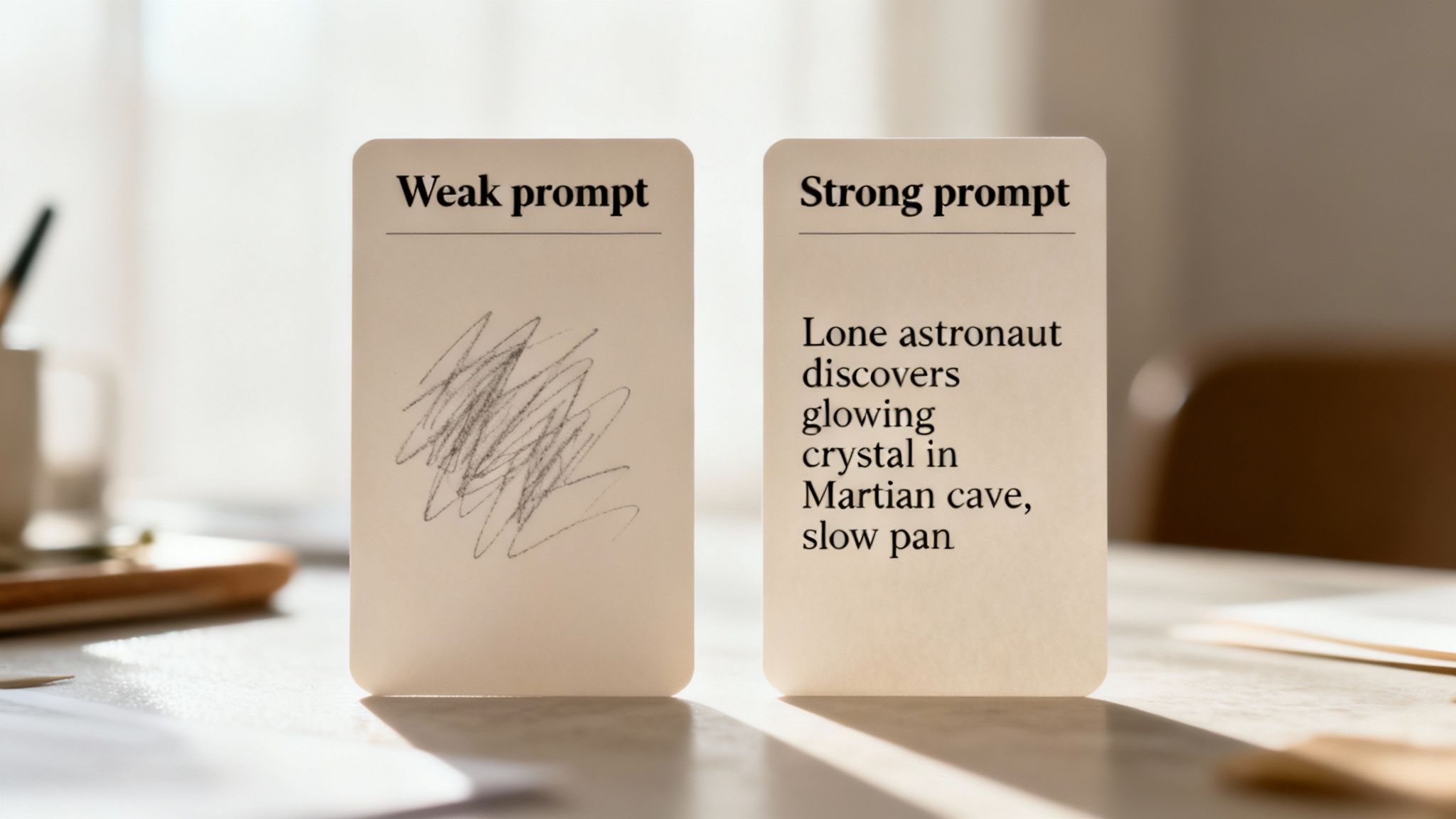
Here’s the deal: the single most important skill you'll develop when using an AI video generator for YouTube is learning how to "talk" to the machine. I’m talking about prompt engineering. The quality of your video is a direct reflection of the quality of your prompt.
Think of a weak prompt as a blurry photo. The AI has to guess what you’re trying to show it, and the results are almost always generic or completely off the mark. A strong prompt, however, is a detailed script. It leaves nothing to chance and guides the AI toward the exact scene you have in your head.
Moving Beyond Basic Keywords
So many creators start with vague, one-line ideas and then get frustrated when their videos fall flat. A prompt like "a hero's journey" is essentially useless. Who’s the hero? Where are they? What’s their goal? The AI is forced to fill in these massive gaps, and it will almost always default to the most cliché imagery it knows.
To get anything good, you need to think like a film director. Your prompt has to contain the core DNA of a scene.
- Subject: Who or what is the focus? Get specific. Don't just say "a knight"; say "a weary knight with a dented helmet."
- Action: What are they doing? This is what drives the story forward. "A weary knight kneels before a glowing sword" immediately tells a story.
- Setting: Where is this all happening? The environment is everything for setting the mood. "...in a moss-covered, forgotten temple" feels completely different from "...in a bustling castle courtyard."
- Atmosphere: What’s the emotional vibe? Use descriptive language to paint a picture. "...sunlight filtering through a broken roof, dust motes dancing in the air" adds a layer of magic and history.
When you weave these elements together, you turn a fuzzy concept into a concrete, renderable scene.
The Anatomy of a Powerful Prompt
A truly killer prompt goes a step further by including stylistic and cinematic instructions. This is how you really take the reins and control the final look and feel, making sure the video aligns with your channel's brand and the story's tone.
Pro Tip: I've learned that my first prompt is rarely the final one. The best way to work is iteratively. Start with your core idea, generate a clip, see what you get, and then go back and refine the prompt with more specific details. It's a process of dialing it in until it matches your vision.
Let's look at a real-world example. Say you're making a quick sci-fi short.
- Weak Prompt: "An astronaut on Mars."
- Strong Prompt: "A lone astronaut with a cracked helmet visor discovers a glowing, crystalline plant inside a dark, silent Martian cave, slow-panning shot, cinematic lighting, style of Blade Runner."
See the difference? The second prompt is in another universe. It establishes a character with a problem (the cracked visor), a moment of discovery, a specific setting, a clear mood (dark, silent), and even dictates camera movement and artistic style. This is what separates a forgettable clip from a captivating YouTube Short. You can see more examples of how words become visuals by checking out different text-to-video tools and what they're capable of.
Building Your Prompt Framework
To stay consistent and efficient, it helps to develop a simple, repeatable framework for how you build your prompts. This ensures you don't forget a key detail and helps you create a signature style for your channel over time.
| Element | Description | Example |
|---|---|---|
| Character & Emotion | Define who is in the scene and how they feel. | "A joyful, young girl with braided hair..." |
| Action & Objective | Describe what they're doing and why. | "...chasing a shimmering, magical butterfly..." |
| Environment & Mood | Detail the setting and the overall vibe. | "...through an ancient, sun-dappled forest." |
| Style & Cinematography | Specify the artistic look and camera instructions. | "Studio Ghibli anime style, gentle dolly shot." |
Combine all of those, and you get a complete, powerhouse prompt: "A joyful, young girl with braided hair chasing a shimmering, magical butterfly through an ancient, sun-dappled forest, Studio Ghibli anime style, gentle dolly shot."
Taking a few extra seconds to structure your thoughts this way pays off massively in the quality of your final video. It’s probably the most valuable habit you can build as an AI-powered creator.
Bringing Your Video to Life with Sound and Polish
<iframe width="100%" style="aspect-ratio: 16 / 9;" src="https://www.youtube.com/embed/sLgHqZSe2o0" frameborder="0" allow="autoplay; encrypted-media" allowfullscreen></iframe>
Once your AI tool spits out that first draft, the real fun begins. Think of that initial video not as the final product, but as your canvas. The small, deliberate tweaks you make from this point on are what separate a generic AI clip from a truly compelling YouTube Short that people can't swipe away from.
This is where you, the creator, step in to add personality and a human touch. It’s how you sharpen the message and make sure the video grabs attention in those critical first few seconds. Honestly, skipping this refinement stage is the biggest mistake I see people make; it's why so many AI videos end up feeling a bit flat and lifeless.
Nailing the Format and Pace
Before diving into audio, you have to lock in the visual fundamentals. For YouTube Shorts, two things are absolutely critical: the aspect ratio and the video length.
Your video must be in a 9:16 vertical format. No exceptions. This ensures it fills the entire screen on a phone, which is where nearly everyone is watching. Tools like Nereo are built for this, but it's always a good habit to double-check your export settings.
Next, get ruthless with your timing. Just because you can make a 60-second Short doesn't mean you should. Your job is to tell the story as quickly and efficiently as possible. I always trim any dead space at the beginning and end and mercilessly cut any scene that isn't pulling its weight. In the world of short-form video, every single second is precious real estate.
Crafting Your Audio Experience
On YouTube, audio isn't just background noise—it's at least half the viewing experience. It sets the mood, delivers the core message, and keeps people engaged. You've basically got three layers to play with, and the magic is in how you blend them.
-
Voiceover: You have a choice here. You can go with a clean, perfectly paced AI voice, which is great for "how-to" or news-style content where clarity is king. Or, you can record your own voice. This adds a layer of authenticity that can help you build a real connection with your audience. There's no right answer, but make it a conscious choice that fits your brand.
-
Background Music: Music is pure emotion. The key is to find a track that supports the vibe of your video, not one that hijacks it. A dramatic, mysterious Short paired with cheerful pop music just feels wrong and will immediately pull viewers out of the experience.
-
Sound Effects: Never, ever underestimate the power of a few well-placed sound effects. A simple whoosh on a transition or a click when an icon appears can make your video feel ten times more professional and dynamic. If you want to get some ideas, it's worth exploring the different video effects that can elevate your content.
Here's a pro tip for your audio mix: Your music should always support the voiceover, never compete with it. I usually set my music volume just low enough to be felt more than heard. If someone has to strain to understand what's being said, you've already lost them.
Why Subtitles Are Non-Negotiable
Finally, let's get serious about subtitles. In a world where most mobile videos are viewed with the sound off, on-screen text isn't just a nice-to-have; it's an absolute necessity.
Think about it: a huge chunk of your potential audience is scrolling through their feed on the bus, in a waiting room, or late at night. Without subtitles, your entire message is completely invisible to them.
The good news is that most AI video generators can automatically transcribe your audio and burn the captions right into your video. Taking a few extra minutes to enable this feature and check it for typos is one of the highest-impact things you can do. It makes your content accessible, boosts watch time, and is the final touch that signals a polished, professionally made Short.
Getting Your AI Shorts Seen: Thumbnails and SEO
Making a slick video with an AI video generator for YouTube like Nereo is a huge win, but it’s really just the first part of the job. If nobody sees your creation, was it ever really made? The next, and arguably most important, step is to make sure people can actually find it. This is where a little bit of SEO savvy and a smart approach to thumbnails come into play.
An incredible video needs an equally clever strategy to get in front of the right audience. Without optimizing your title, hashtags, and thumbnail, you're basically shouting into the void. This part of the process is less about the AI and more about smart, human-led marketing.
Writing Titles That Get Tapped
Your title is your first—and often only—chance to grab someone's attention. With Shorts, screen space is tight, so every single character matters. The goal is to be intriguing and descriptive at the same time, weaving in your main keyword without sounding like you're just writing for the algorithm.
Forget a generic title like "Cool AI Animation." Instead, aim for something that piques curiosity while clearly signaling what the video is about. A much better title would be something like, "This AI Created a Ghibli-Style World #shorts". It's short, has a clear hook ("This AI Created..."), hints at the visual style ("Ghibli-Style"), and includes that all-important hashtag.
Here are a few title formulas I've seen work really well for Shorts:
- Focus on the result: "I Turned a Simple Poem into an Epic AI Film"
- Ask a compelling question: "What if Van Gogh Painted a Cyberpunk City?"
- Create a little mystery: "You Won't Believe What This AI Generated"
See the pattern? Each one is punchy and makes a clear promise to the viewer. That's how you earn the click.
A Smarter Hashtag Strategy
Hashtags are your direct line to the YouTube algorithm, telling it exactly who needs to see your video. A classic mistake is to either skip them entirely or just cram the description with dozens of random tags. Trust me, a more focused approach works much better.
You want a healthy mix of broad, popular tags and more specific, niche ones.
- The Non-Negotiable: You absolutely must include #shorts. This is what officially tells YouTube to categorize your video as a Short and get it on the Shorts shelf.
- Broad Category Tags: Next, add 1-2 high-traffic tags related to your overall topic. For what we're doing, that would be something like #ai or #animation.
- Niche-Specific Tags: Finally, get granular. Add 2-3 tags that describe the really unique parts of your video, like #aianime, #midjourney, or #scifishorts.
This strategy lets your video play in the big leagues of high-volume tags while also dominating smaller, more targeted streams where it can really stand out.
The thumbnail is the single biggest factor influencing whether someone clicks on your video. A great thumbnail paired with a decent title will always beat a great title with a weak thumbnail. Every single time.
Mastering the "Hero Frame"
With YouTube Shorts, you don't get to upload a custom thumbnail the way you do with long-form videos. YouTube just grabs a frame from your video and uses that. While this sounds like a limitation, you can totally use it to your advantage. The secret is to deliberately create a "hero frame."
What does that mean? It means you need to bake a perfect, scroll-stopping image right into the first 1-3 seconds of your video. This frame should be designed from the ground up to look like an amazing thumbnail—it needs to be clear, visually striking, and make people curious. By front-loading your absolute best shot, you massively increase the chances that YouTube will pick that exact frame as the preview.
This simple trick gives you back control over that critical first impression. And the impact is huge. Data shows that 72% of creators now use AI-edited thumbnails, which has led to a stunning 38% increase in click-through rates. It’s a clear sign of how vital these tools have become. You can find more data on how AI is changing the game for creators in this breakdown.
Putting these simple SEO and thumbnail strategies to work is what ensures your AI-generated videos don't just look amazing—they actually get seen. It's the final piece of the puzzle that connects your creativity with a waiting audience.
Building a Scalable Content Production Workflow
It’s one thing to have a single Short go viral with an AI video generator. That's a great feeling. But building a channel that lasts? That's a marathon, not a sprint. The real secret to success on YouTube is consistency, and you can't be consistent without a solid system. This is where you graduate from being a creator to a producer, building an efficient workflow that lets you pump out content without burning out.
A good system takes the guesswork out of the process. Instead of reinventing the wheel every time you want to make a video, you create a production line. This frees up your creative energy for what really matters: the ideas themselves. It's also how you maintain a reliable publishing schedule, which is a massive signal to the YouTube algorithm that your channel is active and worth paying attention to.
Develop a Prompt Library
One of the biggest time-savers I've found is creating a 'prompt library' for my signature video styles. As you start to figure out what prompts get you the best results for your niche, save them in a document. This library becomes your secret weapon for cranking out high-quality, on-brand content in a fraction of the time.
Think of it as having visual templates ready to go. You’re not starting from a blank page; you're just grabbing a proven prompt and swapping in the new story details.
- For Explainer Videos: Keep a prompt handy that locks in a clean, minimalist animation style and your specific color palette.
- For Storytelling Shorts: Nail down that prompt that gives you the perfect '80s sci-fi anime' or 'dreamy watercolor fantasy' vibe every time.
- For Character-Driven Content: Save your go-to character descriptions so you can easily adapt them for new scenarios.
This trick doesn't just save you a ton of time. It also gives your channel a cohesive look and feel, which is absolutely critical for building a recognizable brand.
Standardize Your Upload Process
Getting the video rendered is only half the battle. The upload process itself can be a major time-drain if you're disorganized. The solution? Create templates for your metadata—your titles, descriptions, and hashtags.
I keep a template in a simple notes app that looks something like this:
- Title Placeholder:
[Compelling Hook] - [Topic Keyword] #shorts - Standard Description: A pre-written blurb about my channel, always ending with a call to subscribe.
- Core Hashtag Group: A block of my most effective, evergreen hashtags that I can copy-paste for every video, adding just a few unique ones each time.
When you systematize the repetitive stuff, you free up so much mental energy. You get to spend more time brainstorming and less time staring at the YouTube upload screen. That’s a huge win for your long-term creativity and the health of your channel.
This infographic breaks down the key SEO pieces you'll want to standardize in your workflow to get found more easily.
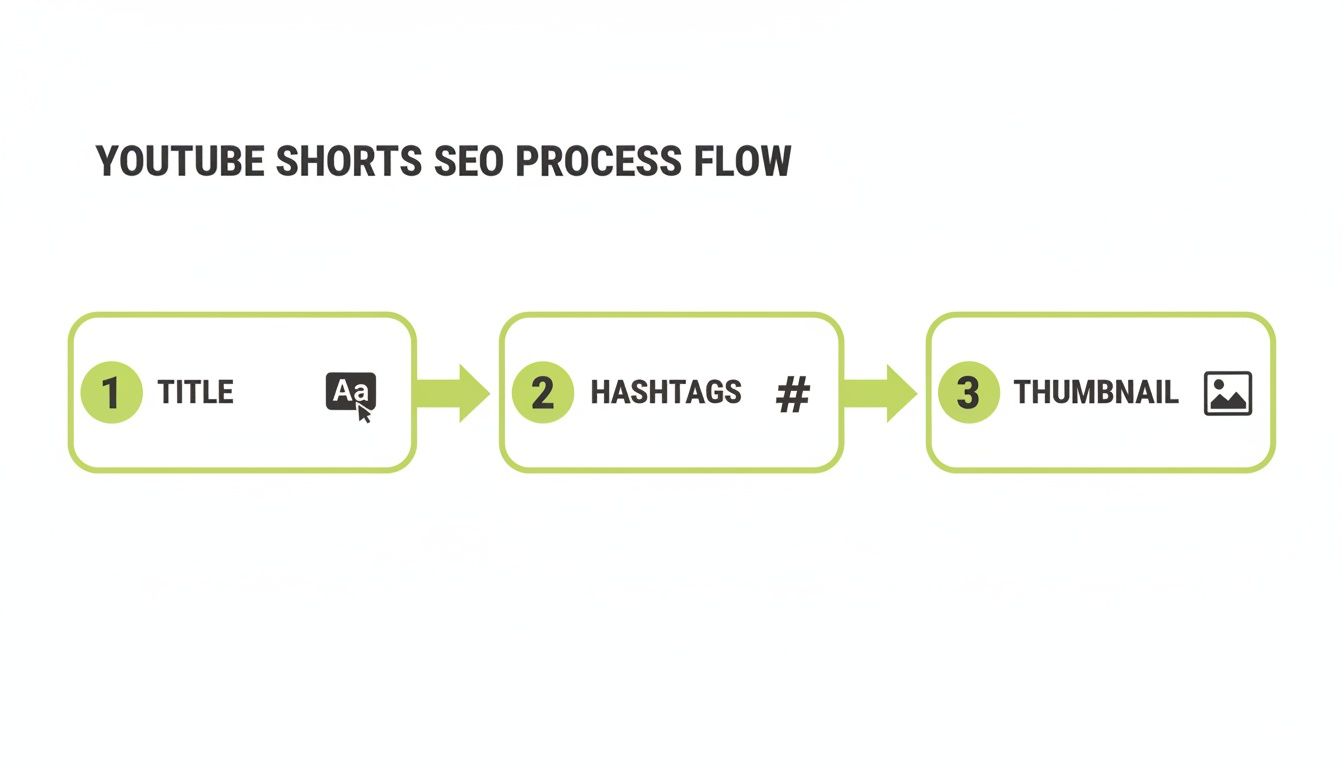
As you can see, having a templated approach for titles, hashtags, and even your thumbnail's "hero frame" creates a smooth, efficient path to optimizing every single Short you publish.
From Consistency to Monetization
This kind of efficiency is what paves the road to real channel growth and, eventually, monetization. A steady flow of content brings in more subscribers, racks up watch time, and boosts your visibility—all things you need to qualify for the YouTube Partner Program. Once you're publishing consistently, you can check out Nereo's pricing plans to find a subscription that can scale with your ambitions.
Having a dialed-in workflow also makes your channel way more appealing for brand sponsorships and affiliate marketing. Brands want to partner with reliable creators who have an engaged audience and a predictable schedule. An AI-powered system shows them you mean business.
This isn't just a creator trend; it's reshaping the whole platform. Today, nearly 58% of YouTube advertisements are either fully AI-generated or enhanced with AI, proving how deeply this tech is embedded in YouTube's commercial engine.
Repurpose and Amplify Your Content
Finally, a truly scalable workflow doesn't just stop at YouTube. Those vertical videos you’re making are gold on other platforms. Don't let your hard work live in just one place.
Be smart about repurposing your AI-generated Shorts for TikTok and Instagram Reels. This is a simple way to explode your reach and build your brand across the social web without having to create completely new videos. Often, you can post the exact same video and just tweak the caption and hashtags to match the vibe of each platform. It’s a low-effort, high-reward strategy that funnels new audiences back to your main channel on YouTube, creating a powerful growth loop.
Got Questions About AI Video? We've Got Answers.
Jumping into AI video creation for YouTube is exciting, but let's be honest, it also brings up a ton of practical questions. How does this all work with YouTube's rules? Who actually owns what I create? It’s totally normal to wonder about these things as you shift from old-school editing to a more modern AI workflow.
Think of this as your quick-start FAQ for navigating the real-world side of using an AI video generator for YouTube. We’ll clear the air on the big topics—money, ownership, and making sure your content actually looks like your content.
So, Can I Actually Monetize These AI Videos on YouTube?
This is the big one, right? And the answer is a resounding yes. YouTube's Partner Program doesn't care what software you use; it cares about the value you provide. If your video is original and engaging, it’s eligible for monetization. Simple as that.
The catch is that you have to be the creative force behind it. You can't just hit "generate" on a generic prompt and upload the first thing that pops out. Your creative stamp is what makes it yours. This comes through in a few key ways:
- Writing killer prompts that tell a unique story nobody else has thought of.
- Editing with intention—maybe you're stitching together several AI clips, tweaking the timing, or adding your own sound design to nail the pacing.
- Adding your own audio fingerprint, whether that’s a custom voiceover or a specific style of music that becomes part of your channel’s identity.
Bottom line: as long as you're using the AI as a creative partner to execute your vision, you're playing by YouTube's rules.
Who Owns the Copyright for the Videos I Make?
Copyright with AI can feel a bit like the wild west, but for most creators using established platforms, it's actually pretty clear-cut. The terms of service of the tool you're using will spell this out.
Most top-tier platforms, like Nereo, are built specifically with creators and businesses in mind. This means they usually grant you full commercial usage rights for anything you produce. You own the final video. You can upload it to your YouTube channel, run it as an ad, or post it on TikTok without looking over your shoulder for copyright claims.
Pro Tip: Before you go all-in on any AI tool, spend five minutes reading their terms of service. It’s a small bit of homework that gives you total peace of mind, confirming you have the legal green light to monetize and share your work everywhere.
How Can I Make Sure My AI Videos Don't Look...Well, Generic?
With more creators using these tools every day, the last thing you want is for your content to blend into a sea of sameness. The secret to avoiding that cookie-cutter "AI look" is to be deliberate about developing a signature style.
It all starts with how you talk to the AI. Your prompts are your paintbrush. Don't just ask for "a futuristic city." Get specific and inject some personality. Try something like, “a rain-slicked cyberpunk city street at midnight, neon signs reflecting in the puddles, in the style of a classic 80s sci-fi anime with a soft, grainy film texture.” See the difference? That level of detail forces the AI to create something truly custom for you.
Then, you layer on your other brand elements:
- Settle on a consistent color palette that runs through all your videos.
- Find a specific genre or style of music that feels like your channel’s official soundtrack.
- If you use a voiceover, keep the tone and delivery style consistent.
When you start combining these elements, you’re no longer just using an AI video generator for YouTube. You're using a powerful creative tool to bring a distinct and memorable vision to life.
Ready to create stunning, original anime shorts for your channel? With Nereo, you can turn a single prompt into a complete 60-second video with story, characters, and authentic art styles. Try Nereo for free today and start building your audience.